-
Phone
13439993923
-
Address
Room G13, Building B, No. 10, Wujian Building, Yongwai East Blacksmith Camp, Fengtai District, Beijing
Product Categories
Beijing Pinzhi Chuangsi Precision Instrument Co., Ltd
Optical image measurement software
NegotiableUpdate on 02/26
- Model
- Nature of the Manufacturer
- Producers
- Product Category
- Place of Origin
Overview
Optical image measurement software This software is applicable to digital products such as video microscope, metallographic microscope (measuring size is not metallographic analysis), imager, anime, knife sharpener microscope, etc.
Product Details
Optical image measurement softwarebrief introduction
The working principle of the measurement software is to optically magnify the object being measured, and then capture the image onto the computer through a professional CCD and digital acquisition card, utilizing the powerful functions of the software. Perform non-contact measurement work. The characteristic is precise measurement and the ability for multiple people to simultaneously observe the indication of the measured object for analysis. Combining traditional optics and digital technology, it has powerful software functions that can digitize images previously observed with the naked eye under a traditional microscope, store them in a computer for various measurements and graphics, and then store the obtained data in the computer for future storage or email transmission.
The measurement results of the measurement and control system software can be output in Microsoft Word and Excel with company header and background information added, and can be dynamically transmitted synchronously with AutoCAD. Based on the above functions, it is required that the computer system on which the system is installed should be pre installed with Microsoft Office and AutoCAD to support the software's functionality.
This measurement software is suitable for all application fields aimed at two-dimensional measurement, such as quality inspection, engineering development, drawing, etc. Widely used in industries such as machinery, molds, cutting tools, plastics, electronics, and instruments.
Optical image measurement softwaredescribe
Drawing function: It can draw points, lines, circles, arcs, spline curves, vertical lines, parallel lines, etc., and input the graphics into AutoCAD to achieve reverse engineering and obtain 1:1 engineering drawings.
Automatic surveying: It can automatically survey shapes such as circles, ellipses, lines, arcs, etc. It has functions such as automatic edge searching, automatic capture, automatic mapping, and automatic deburring, reducing human error.
Measurement annotation: It can measure any geometric dimension of the workpiece surface, including angles, widths, diameters, radii, center distances, and other dimensions at different heights, and can annotate dimensions in real-time images.
SPC statistical analysis software: provides a series of control charts and various types of chart representation methods, making quality control work more convenient and greatly improving the efficiency of quality management.
Report function: Users can easily output measurement results to WORD or EXCEL, automatically generate inspection reports, and automatically change the color of out of tolerance values, making it particularly suitable for batch inspection.
Bird's-eye view function: It can view the overall shape of the workpiece and the corresponding numbers for each size, intuitively reflecting the current drawing position, and can freely move and scale the workpiece image.
Real time comparison: Standard DXF engineering drawings can be imported into measurement software and compared with workpieces to quickly detect the difference between the engineering drawing and the actual workpiece, suitable for detecting complex workpieces.
Photography function: The current image and annotated dimensions can be photographed and saved in JPEG or BMP format, and can be imported into measurement software for comparison with the actual workpiece.
Optical glass: Optical glass is a standard component that has been inspected and approved by the National Bureau of Metrology. It can be used to check the verticality of the X and Y axes, set a scale, and ensure that the measurement data matches the actual situation.
Customer coordinates: During measurement, there is no need to align the workpiece or fixture positioning. Users can set customer coordinates (workpiece coordinates) according to their own needs, which is convenient, time-saving, and improves work efficiency.
Software interface description

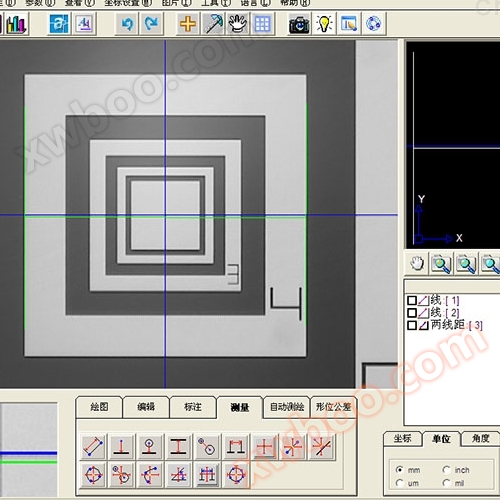
A. Menu bar B. Common shortcut keys C. Image display and drawing area D. Drawing data area
E. Overview F. Overview Tool Panel G. Local Zoom Area H. Status Data Display Area
I. Common Customer Settings Options J. Imaging and Drawing Tools Panel K Grating Data Area
Description of the toolbar
menu bar

Here is a collection of all the regular operation functions of the software, and the specific operation introduction will be detailed later.
Common shortcut keys

1. Output Word document
2. Output Excel report
3. Save the file as a Dxf file
4. Switch to SPC window
5. Launch AutoCAD
6. Export all graphic elements to AutoCAD
Step back (undo)
8. Forward (REDO)
9. Hide/Show Cross Lines
10. Set the drawing scale
11. Stop/Start Object Snap
12. Stop/Start Grid
13. Take photos
(Note: Some of the above function keys require pre installed software to be used) Imaging and drawing tool panels
1)draw

2)edit

3)Annotation

4)measure

5)Automatic mapping

Software measurement effect diagram


Similar Product Recommend


